Replacing a legacy duty sign-on tool with a mobile PWA for onboard staff and a web app for Traffic Control, so late sign-ons can be foreseen and unexpected staffing changes handled.
Role
Lead UX/UI designer and feature lead
Timeline
May 2023 – Dec 2023
Team
Cross-functional team
Focus
UX/UI, mobile PWA, role-playing simulations
Outcome
3,000 onboard staff moved to the new app overnight.
Loading case…
The challenge
How might Traffic Control foresee which staff are at risk of signing on late?
SJ is Sweden’s market-leading railway company, transporting 100,000 passengers daily across 400 stations. Its Traffic Control department covers fleet operations, staffing and customer communication, and keeps the services reliable, efficient and safe.
Every member of a train crew must sign on to their trip, so the operational planning staff know the train can leave on time. If someone doesn’t, planners have to find replacement staff and make difficult decisions: delay the train or let it run. A delay of a few minutes affects SJ’s own schedule and the whole rail network, especially on single-track lines, where trains running in opposite directions must be planned so they can pass each other safely.
Signing on to a train duty ran through a legacy application. SJ wanted to move the process to two new applications: a web app for staff management, used by Traffic Control, and a mobile progressive web app (PWA) that onboard staff use to sign on to a duty. The project had three goals:
Foresee and get an overview of the staff who are at risk of running late.
Improve the routines for managing unexpected staffing changes.
Spot trends in staff sign-ons.
My role
I joined as lead UX/UI designer and took over from a previous designer. I reviewed the existing designs as a whole and iterated on them to fit the goals of the project, then guided the design of both applications through to release.
I was also the feature lead, responsible for taking the feature through the product lifecycle, from discovery to delivery. That meant removing blockers, talking to stakeholders and facilitating activities.
The app is small, so I changed little of the previous designer’s work. I updated the breath-test states, added contact information, error handling and loading states, and worked on the phone notifications: I wrote their copy and helped decide how often they were sent.
Role-playing simulations
The team had raised questions and risks, and we discussed them first. To test them, I facilitated role-playing simulations of real interactions between Traffic Control and onboard staff using the two applications together. Real staff from Traffic Control operations took part, alongside members of the team.
I synthesised the findings in an affinity diagram and used it to prioritise what to change:
An easy way for staff to contact Traffic Control, and for Traffic Control to reach the rest of the crew to check whether an absence was real.
An indicator that a late crew member put the departure at risk.
Roles kept apart, because a train cannot leave without its driver but can leave without some other roles.
In the simulations we could also test whether the breath-test results reached Traffic Control in the required format. They did, so staff who passed could be signed on to their trip automatically.
The app
Signing on from the phone
The interface is in Swedish. The names are test data.
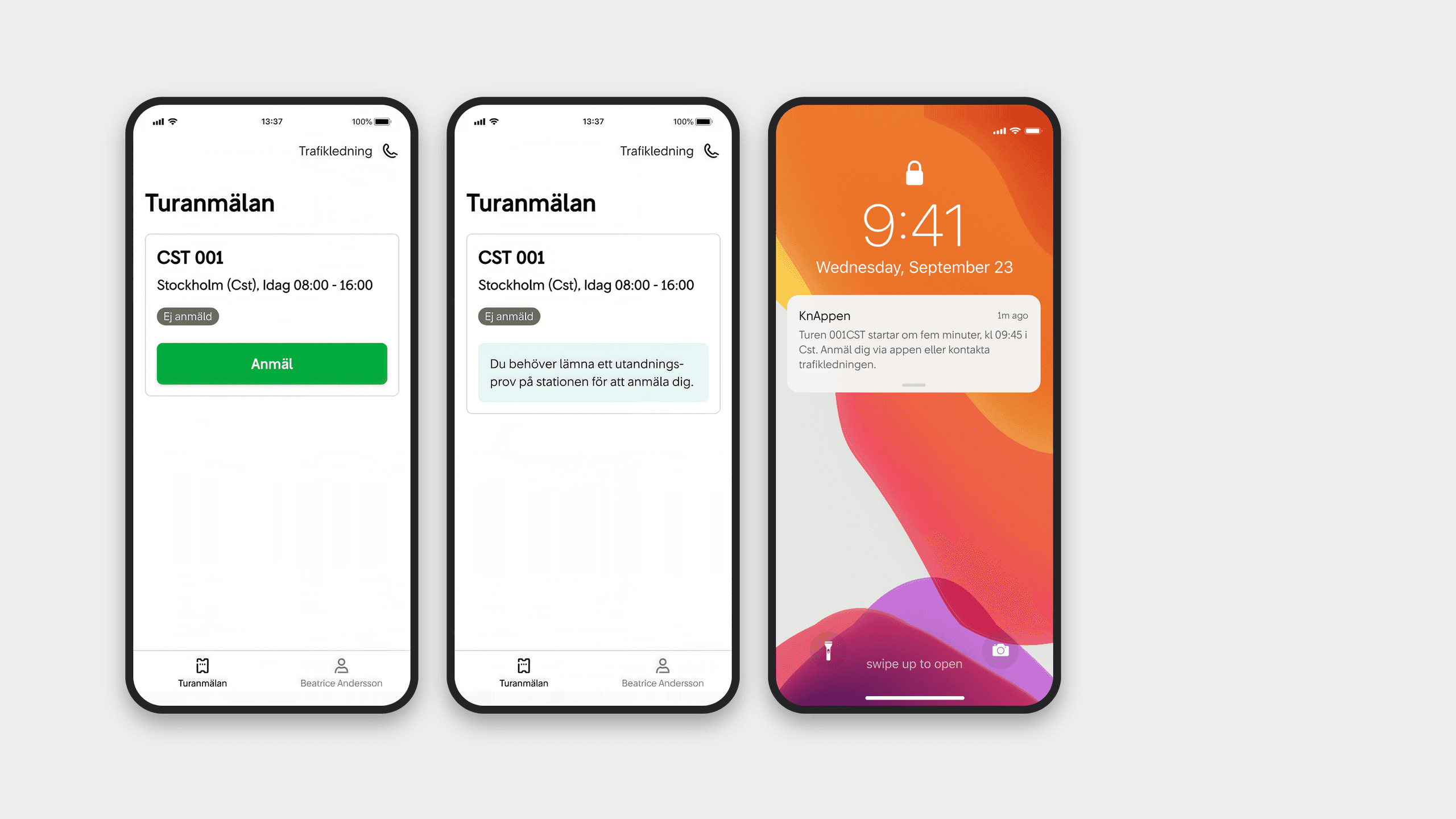
The first screen lists the duties coming up in the next 24 hours. Each duty shows its code, place and time, and whether you have signed on. Staff can’t sign on too far ahead, so planning stays predictable, but they can sign on earlier than the hour before a duty, because of working agreements for staff who sleep over at other locations. When a breath test is needed, the sign-on button gives way to an instruction. Only some roles need one: drivers, for instance, must pass an alcohol test before they may legally drive the train. Five minutes before a duty starts, a reminder points to the app or to Traffic Control. It is there because people sometimes forgot to sign on, which caused problems for the operational planning staff.
Sign on
Breath test
Reminder
Signing on to a duty. The reminder is a lock-screen notification.
The duty screens keep a Traffic Control link in the header, so staff can still reach it when something fails. When loading fails, the error screen offers a reload and points to Traffic Control. Errors are handled locally, so one failed request doesn’t stop staff from using the rest of the app.
No duties
Error
Profile
The states around the main flow.
Outcome
The launch moved 3,000 onboard staff to the new app overnight, in a hard cut-over with technical team members working in shifts. Before it, I helped test the breath-test hardware and its integration with the system, and coordinated the rollout of the app to staff’s managed phones, testing it on a test device first. Follow-up interviews confirmed that it had become easier to foresee late sign-ons and to manage unexpected staffing changes.